Running a shelter
The shelter administration section is the part of the site for the people who run one shelter: who works there, how much money has arrived, what the shelter has switched on, and who changed what. Every pane is about that one shelter, and beside each pane's name a “?” opens this guide at that pane.
Who can get in
The section is open to the shelter's owner — the account whose unique id is recorded on the shelter itself — and to anyone with an active row on the volunteer roster in the manager or administrator role. Being a platform administrator does not by itself open somebody else's shelter, and that is deliberate: one stolen sign-in must not open every organisation on the site.
The administration pages are not indexed, never appear in search, and do not exist without a sign-in. This guide is public — describing a pane is not the same as reaching it, and a manual you can only read after signing in is no help to somebody trying to understand the sign-in.
Seven panes
There are seven panes and each answers one question. Beside a pane's name is a “?” that opens this guide at that pane's section.
The strip of names usually shows five: Overview, Volunteers, Finance, Settings and the change log. Usage opens from Overview's own numbers, and App from inside Settings — both keep their own address and their own place in this guide, they simply no longer have a tab of their own in the strip.
- Overview — what is switched on, and how many animals, people, campaigns and donations the shelter has.
- Volunteers — the roster, the roles, deactivation, and inviting new people.
- Finance — what has arrived, what has not yet been passed on to the shelter, and recording the bank transfer.
- Settings — what the shelter shows and what it takes part in.
- Usage — how much work is actually being done, counted out of the database.
- Audit — who changed what, and when.
- App — the phone app's identity and the commands that build it.
Overview
Every line on this pane is a real check the server has just made — against the database, the settings, or its own configuration. Nothing is assumed: a subsystem that did not answer is shown as off, because a missing answer is not a yes.
Two figures are wider than they look and are labelled as such. The daily digest numbers are for the whole site, because a person subscribes to the digest and a shelter does not. “Unremitted” is the same amount the Finance pane shows, worked out in exactly the same way.
This pane does not exist inside the phone app as the same screen — the app has its own Shelter tab landing, with similar numbers, but that is a separate screen rather than this pane opened small.
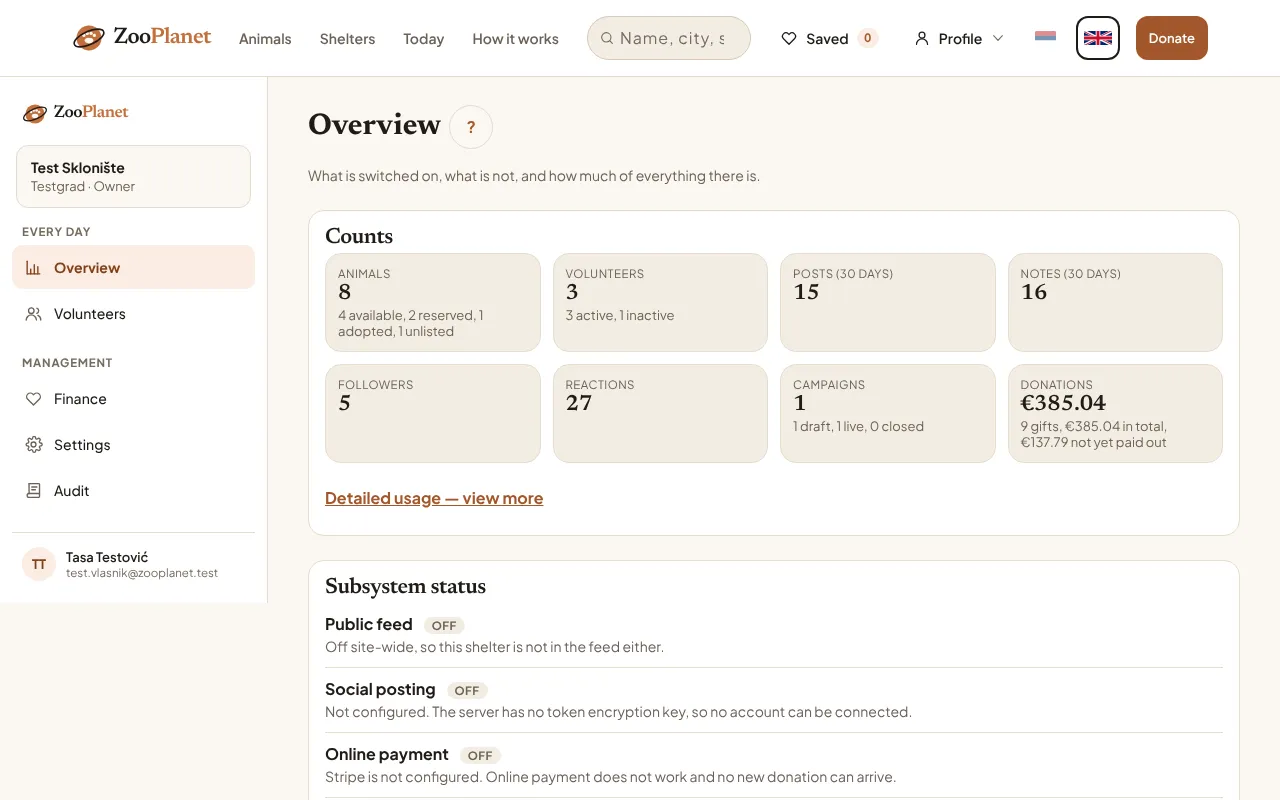
- The “?” beside the pane's name opens this guide at that pane.
- This shelter’s counts: animals, team, campaigns, donations.
Volunteers
The roster is one row per person per shelter, and the same person can belong to several shelters. People are added one way only: by invitation, described at the end of this guide. If the address already has an account, the person is on the roster at once; if not, the invitation waits until they open an account and confirm the address.
There are three roles: volunteer, manager and administrator. A volunteer works with the animals; a manager or an administrator can also open and change this section. Joining the roster grants somebody the volunteer role site-wide if they do not have it, and that role is not taken away again by removing them from the roster.
There are three states, and they do not quite mean what their names promise.
The same pane also opens inside the app, called Team, from the Shelter tab. Every volunteer can see it, but only whoever administers that shelter can change it — anybody else gets a sentence instead of the list.
- Invited — the row exists and grants nothing. No screen produces this state today: an invitation to an address with no account waits in a separate Pending invitations list rather than on the roster, and the person joins as active the moment they confirm the address.
- Active — working. With the manager or administrator role this is also the only way somebody who does not own the shelter can reach this section.
- Deactivated — still on the roster, still in the audit trail and still credited under everything they wrote, but no longer allowed to change this shelter's animals. Reactivating restores all of it.
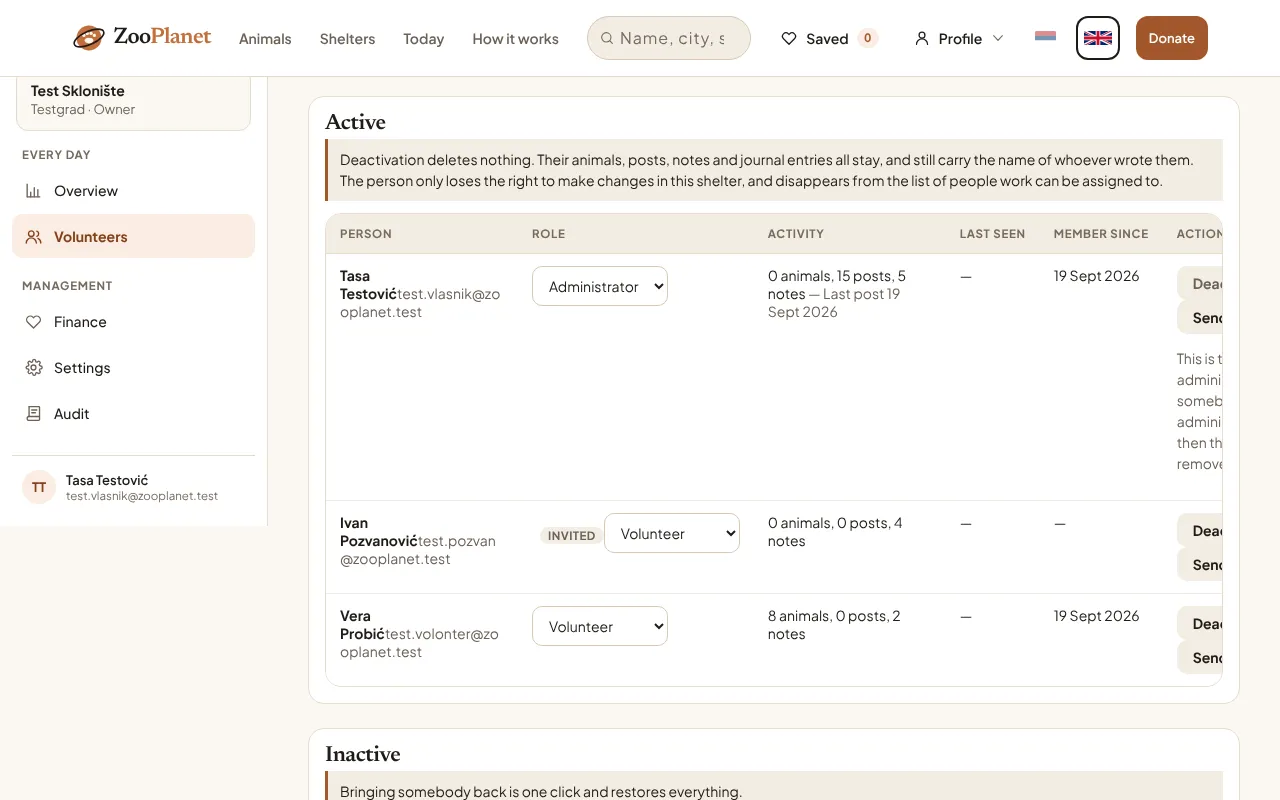
- The active team: role, last activity, and the deactivate and invite buttons.
- A badge beside a name reports any state that is not “active” — here, invited.
Deactivation deletes nothing, and cannot: an account that has posted, noted or donated is one the database refuses to delete. The last active administrator can be neither deactivated nor demoted — not even by themselves — because the shelter would be left with nobody able to edit the roster.
Finance
This platform is the recipient of the payment. The money arrives here and is passed on to the shelter by a bank transfer a person makes — Serbia is not a country Stripe pays out to, so there is no other way. “Unremitted” is the total of the net amounts of successful donations meant for this shelter that have not yet been marked as passed on.
“Net” is the amount less an estimated fee, not the real one: the actual fee and the actual payout are never fetched from Stripe. A refund made in the Stripe dashboard does not show up here, and the donation counters on animal and shelter pages are an editorial field that is not worked out from this ledger.
The pane is not only a report. Below the list is a form for recording a transfer a person has already sent — amount, reference, method — which is what finally answers “which transfer paid for this donation”, a question that previously had no answer at all.
The same pane is called Donations in the app and opens from the Shelter tab, for a shelter administrator only — the figures agree because it is the same pane, not a second view of it.
- The date filter changes the totals and the list but never “unremitted”: unremitted is unremitted whenever it arrived, and a figure that moved with the filter is one nobody could reconcile against a bank statement.
- A donor's address is shown nowhere in this section. It is not hidden at the point of display — no query this pane uses reads that column at all.
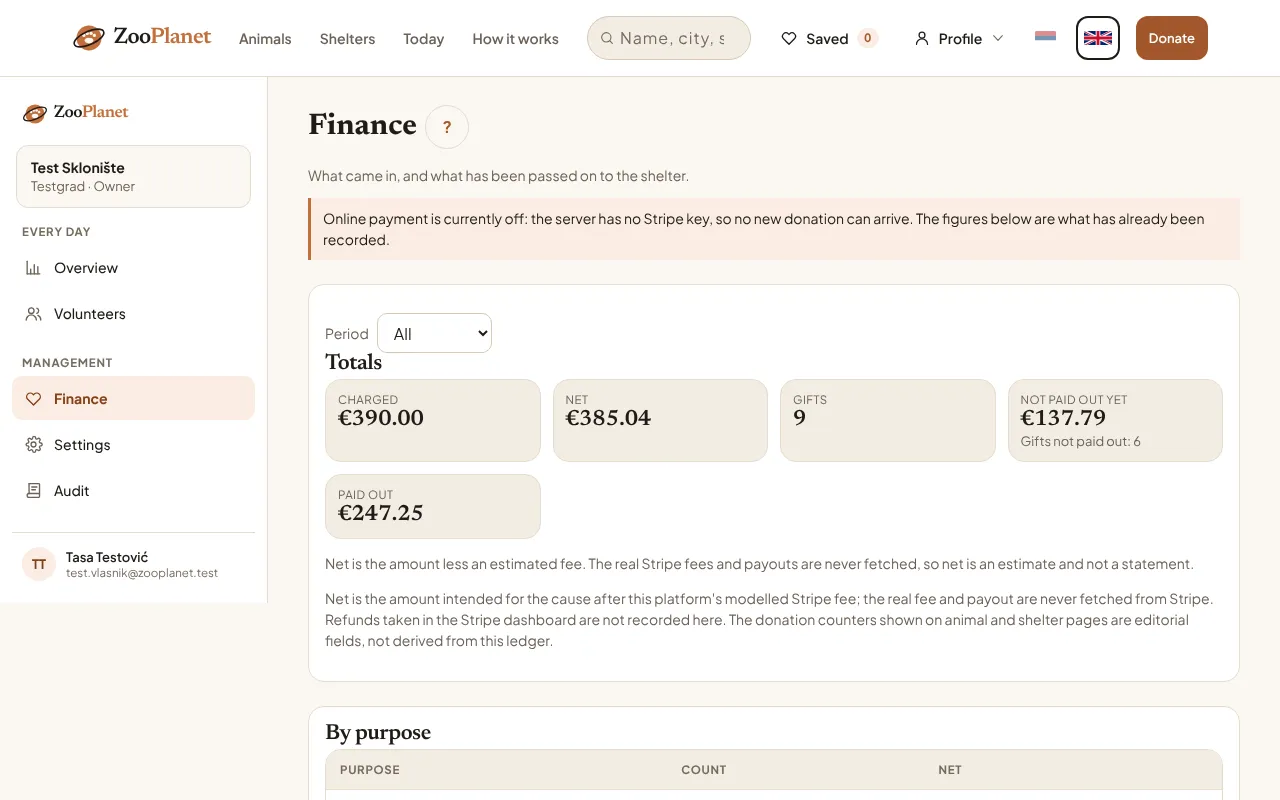
- Unremitted: arrived, and not yet passed on to the shelter.
- The caveats the server states alongside every figure.
The “mark unremitted donations as passed on” box is ticked by default and what it does cannot be undone: there is no screen and no button that returns donations to unremitted. Record the transfer only once the money has actually gone.
Settings
Settings are a document of seven groups. Saving one group leaves the others alone; an unknown key is refused by name when written, and quietly dropped when read, so rolling the server back to an older version cannot break the pane.
This is mostly a record of the shelter's decisions rather than a switch on the whole site. Statuses are the exception: the server checks them every time an animal is saved. Today only this section reads them — Overview reports from them whether the shelter takes part in the feed, and the App pane reads its own group — while the rest of the site does not yet consult them: turning feed participation off does not remove animals from the feed, and turning the digest off does not stop the e-mail. When that changes, this paragraph changes with it.
The same pane is called Settings in the app and opens from the Shelter tab. The only difference is the link to the App pane, which does not appear there because the app has no admin address of its own to link to.
- Feed — whether this shelter's animals appear in the public feed and in “Today”, and whether they stay there once adopted.
- Digest — whether this shelter's activity may go into the daily e-mail, and whether internal team notes go with it (by default they do not).
- Networks — what the posting form proposes. Automatic publishing is off by default, and with no connected account nothing here has any effect.
- Donations — whether the donate button and the totals are shown at all, plus a short note the shelter writes itself. Bank details are not entered there.
- Animal of the day — the shelter's preference on whether one is picked automatically and how long before the same animal repeats. The pick itself is currently one for the whole site and is made by a platform administrator, so these two are not yet read by anything.
- App — the name, colour and last published version the shelter wants. The same group is edited from the App pane.
- Statuses — which statuses volunteers can choose, and what they are called in Serbian and English. Available and Hidden are always on. A status switched off is no longer offered, but animals already in it keep it and can still be saved. A name is display only: addresses, filters and search always use the real status.
Usage
Every number on this pane is rows counted out of the database. There is no analytics of any kind in this application: no page views, no visitors, no sessions, no installs, no app opens, and not even a sign-in history, because the access key is overwritten at every sign-in.
Two numbers are narrower than they look and are labelled as such. The write count comes from a ledger only the phone app sends, so edits made on the website are invisible in it — it is a floor, never a total. The daily series are Belgrade calendar days, wherever the reader happens to be.
This pane does not open inside the phone app — the numbers about how much work is actually done stay website-only.
If you want to know how many people have seen an animal, that figure exists nowhere in the system and will not appear on this pane. It answers “how much work is being done”, not “how many people saw us”.
Audit
The audit trail records one row per change: who, what, when, and a short description a person can read. Reads are not recorded, deliberately — a list in which nothing stands out is a list nobody opens.
It also records what volunteers do outside this section: adding, editing and deleting an animal, a team note, a post, the animal-of-the-day pick, and edits to the shelter and to campaigns. The person's address is written into the row itself, so a deactivated volunteer is still credited under their own change. Nothing is deleted from the trail and there is no period after which rows disappear.
The same pane is called Change log in the app and opens from the Shelter tab, for a shelter administrator only.
App
This pane does not build, sign or publish an app. There is one app for every shelter, and the server address is baked into it at build time — a change made here reaches nobody's phone. A separate icon, name or store listing for one shelter would be a separate signed build and its own review.
What the pane actually does: it shows the published app's identity, read from the real configuration and not editable here; it stores what the shelter wants to record, including the version it has published itself; and it prints the exact commands a person runs on the machine where the app is built.
Unlike the other four, this pane does not open inside the phone app — naturally, since it describes how the app itself gets built, which is not something done from the phone the app is already installed on.
Inviting people
On the Volunteers pane, enter the address, choose the access type and press Invite. The person receives an e-mail with install instructions and a link to the download page, and becomes a member of this shelter: at once if they already have an account — even when they already belong to another shelter — or as soon as they open an account and confirm the address if they do not. A waiting invitation can be withdrawn. Inviting somebody who is already a member only re-sends the instructions and leaves their role alone; roles are changed on the roster. The Send the app button beside every active member does the same.
Two limits cannot be switched off: at most twenty invitations per shelter in twenty-four hours, and at most one to the same address every fifteen minutes. The first is a rolling window, so it does not reset at midnight. Both are counted out of the Audit pane, where every invitation leaves a row naming the address, the sender and the outcome.
If no app version is published on the server, the person is still added, but the e-mail is not sent rather than mailing a link to an empty page. If e-mail is not configured on that server at all, the pane says so with a warning rather than a tick.
“Sent” means the mail service accepted the message, not that it reached anybody's inbox. A rejection, a spam filter or a closed address all happen afterwards and no screen in this application ever sees them — so if a volunteer says the invitation never arrived, believe them rather than the tick.